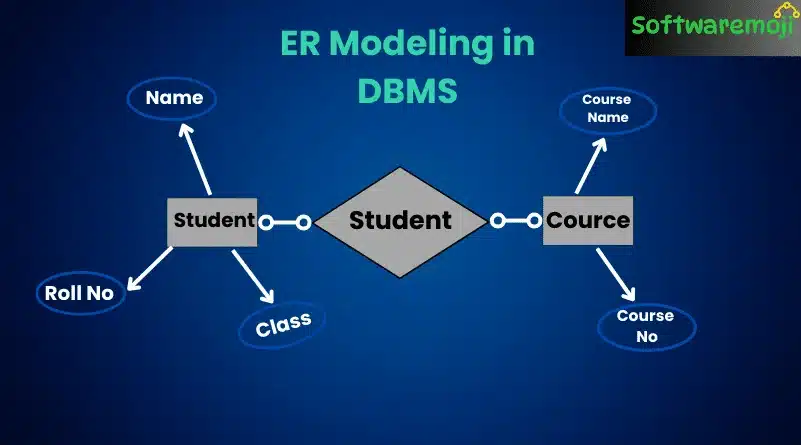
👉What is ER Modeling?
ER Modeling in DBMS: Entity Relationship (ER) Modeling is a graphical database design technique used to visualize the structure of a database. It helps in identifying entities, their attributes, and the relationships between them.
🔹 Key Features of ER Modeling:
Represents real-world objects (entities) and their attributes
Defines relationships between different entities
Helps in structuring database schemas efficiently
Supports database normalization and logical design
👉Example: Consider an Employee Database where:
- Employee is an entity with attributes like Name, Age, and Salary
- Department is another entity
- There exists a relationship between Employees and Departments
👉Key Concepts in ER Modeling
ER Modeling in DBMS: Entity
An Entity is an object or concept in the real world that can be identified distinctly.
👉Example:
- A Student in a university
- A Product in an e-commerce system
Types of Entities:
Strong Entity – Can exist independently (e.g., Student, Employee)
Weak Entity – Depends on another entity (e.g., Order Item depends on Order)
👉 Attributes
ER Modeling in DBMS: Attributes define characteristics of an entity.
👉 Example:
- Employee entity has attributes: Employee_ID, Name, Age, Salary
- Car entity has attributes: Car_ID, Model, Price
Types of Attributes:
Simple Attributes – Single value (e.g., Name, Age)
Composite Attributes – Divided into smaller parts (e.g., Full Name = First Name + Last Name)
Derived Attributes – Calculated from other attributes (e.g., Age from Date of Birth)
Multivalued Attributes – Can have multiple values (e.g., Phone Numbers)
🔹 Relationships in ER Model
ER Modeling in DBMS: A Relationship defines how two entities interact.
👉 Example:
- A Student enrolls in a Course
- A Customer places an Order
Types of Relationships:
One-to-One (1:1) – An employee has one company car
One-to-Many (1:M) – A teacher teaches many students
Many-to-Many (M:M) – Students enroll in many courses, and courses have many students
👉Enhanced Entity-Relationship (EER) Model
ER Modeling in DBMS: The EER Model is an extension of the ER model that includes:
Subclasses & Superclasses – Represent inheritance in databases
Specialization & Generalization – Used to create hierarchies
Category (Union) Relationships – Allow multiple inheritance
👉 Example:
- Employee can be Manager or Technician
- Vehicle can be a Car or Bike
👉Why Use ER Modeling?
ER Modeling in DBMS: You may wonder why ER Modeling is necessary when databases can be created directly. Here’s why:
Visual Representation – ER diagrams help in better understanding of the database structure.
Non-Technical Communication – Helps both technical and non-technical users understand the database design.
Eliminates Errors Early – Identifies design flaws before database implementation.
Easier Transition to Relational Tables – ER models can be easily converted into relational database schemas.
👉ER Diagram Case Study: MyFlix Video Library
ER Modeling in DBMS: Let’s create an ER diagram for MyFlix Video Library, which rents out movies to members.
Step 1: Identify Entities
The main entities in our database:
Members – Stores member details
Movies – Stores movie details
Categories – Categorizes movies (e.g., Action, Drama)
Movie Rentals – Tracks which members rented which movies
Payments – Stores member payment details
Step 2: Define Relationships
Members & Movies: A member can rent multiple movies, and a movie can be rented by multiple members → Many-to-Many Relationship
Movies & Categories: A movie belongs to only one category, but a category can have multiple movies → One-to-Many Relationship
Members & Payments: A member can make multiple payments, but each payment belongs to only one member → One-to-Many Relationship
Since relational databases do not support Many-to-Many relationships, we introduce a junction entity (MovieRentals) to break it into two One-to-Many relationships.
👉Creating an ER Diagram in MySQL Workbench
Step 1: Open MySQL Workbench
Click “+” to add a new ER diagram.
Double-click “Add Diagram” to open the workspace.
Step 2: Create Entities
Drag the “Table” object into the workspace.
Rename it to “Members” and add attributes:
- Membership_Number (Primary Key)
- Full_Name
- Gender
- Date_of_Birth
- Address
Repeat for other entities (Movies, Categories, Rentals, Payments).
Step 3: Define Relationships
Select “Place Relationship Using Existing Columns”.
Click on Membership_Number in Members Table.
Click on Reference_Number in MovieRentals Table.
Repeat for all other relationships.
Now your ER diagram is complete!
👉Summary: ER Modeling in DBMS
🔹 ER Modeling is essential for database design.
🔹 Entities represent real-world objects (e.g., Student, Movie).
🔹 Attributes define characteristics of entities (e.g., Name, Age).
🔹 Relationships describe how entities are connected (e.g., Student enrolls in Course).
🔹 ER diagrams provide a visual representation of the database structure.
🔹 EER models add advanced features like inheritance, specialization, and generalization.
👉 Pro Tip: ER modeling helps in better database structuring and ensures data integrity, consistency, and efficiency.